
OpenAPI / Swagger
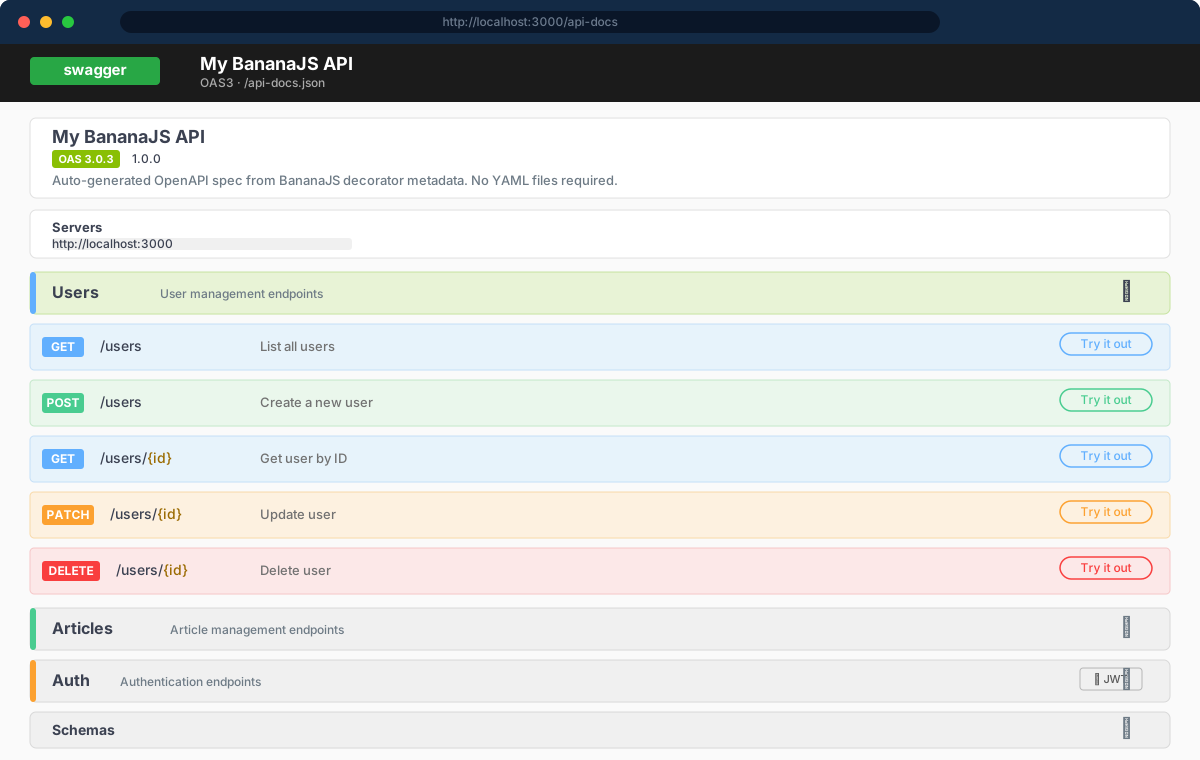
BananaJS generates an OpenAPI 3.0.3 spec automatically from your decorator metadata — no YAML files, no manual spec maintenance. Enable it with one option and the interactive UI appears at /api-docs.
Quickstart
Install the optional peer (already included in apps scaffolded with bjs new):
bash
npm install swagger-ui-express
npm install --save-dev @types/swagger-ui-express
Enable in bootstrap:
typescript
import { BananaApp } from '@banana-universe/bananajs'

new BananaApp({
  modules: [userModule],
  swagger: {
    enabled: true,
    title: 'My BananaJS API',
    version: '1.0.0',
    description: 'Auto-generated OpenAPI spec from decorator metadata.',
  },
})
That's it. Two endpoints are now live:
| URL | Description |
|---|---|
GET /api-docs | Interactive Swagger UI |
GET /api-docs.json | Raw OpenAPI 3.0.3 JSON |
How auto-generation works
BananaJS reads reflection metadata at startup — the same metadata your routing and validation decorators write — and assembles an OpenApiDocument before mounting routes. No code generation step, no build artifact.
What is inferred automatically:
| Source | OpenAPI output |
|---|---|
@Controller('segment') | Path prefix |
@Get, @Post, @Put, @Patch, @Delete | HTTP method + full path |
@Body(schema) | requestBody with JSON Schema |
@Params(schema) | Path parameters |
@Query(schema) | Query parameters |
@Headers(schema) | Header parameters |
@Auth() on class or method | security: [{ BearerAuth: [] }] |
| Controller class name | Default tag (e.g. UserController → User) |
| Method name | Default summary (camelCase → Title Case) |
Enriching the spec with decorators
The auto-inferred output is a good starting point. Use the OpenAPI decorators to add richer metadata:
typescript
import {
  ApiTags,
  ApiOperation,
  ApiBody,
  ApiResponseDoc,
} from '@banana-universe/bananajs'
import { z } from 'zod'

const CreateUserSchema = z.object({
  name: z.string().min(1),
  email: z.string().email(),
})

const UserSchema = z.object({
  id: z.string().uuid(),
  name: z.string(),
  email: z.string().email(),
})

@ApiTags('Users')
@Controller('users')
class UserController extends BaseController {
  @ApiOperation({ summary: 'Create user', description: 'Creates a new user account.' })
  @ApiBody({ schema: CreateUserSchema, description: 'User creation payload' })
  @ApiResponseDoc({ status: 201, description: 'User created', schema: UserSchema })
  @ApiResponseDoc({ status: 409, description: 'Email already taken' })
  @Body(CreateUserSchema)
  @Post()
  async create(req: Request, res: Response) {
    const user = await this.service.create(req.body)
    return this.ok(res, 'created', user, 201)
  }

  @ApiOperation({ summary: 'Get user by ID' })
  @ApiResponseDoc({ status: 200, description: 'User found', schema: UserSchema })
  @ApiResponseDoc({ status: 404, description: 'Not found' })
  @Params(z.object({ id: z.string().uuid() }))
  @Get(':id')
  async getById(req: Request, res: Response) {
    const user = await this.service.findById(req.params.id)
    if (!user) throw new NotFoundError('User not found')
    return this.ok(res, 'ok', user)
  }
}
OpenAPI decorator reference
| Decorator | Target | Description |
|---|---|---|
@ApiTags(...tags) | Class | Group endpoints under one or more tags |
@ApiOperation(options) | Method | summary, description, deprecated |
@ApiBody({ schema, description?, required? }) | Method | Override inferred request body; accepts a validation schema |
@ApiResponseDoc({ status, description, schema? }) | Method | Document one response status; stackable |
Tip:
@ApiBodyis optional when@Body(schema)is already applied — BananaJS infers the request body schema directly from the validation decorator.
Authentication in the spec
When auth.guard is configured, BananaJS adds a BearerAuth security scheme automatically:
typescript
new BananaApp({
  auth: { guard: new JwtGuard() },
  swagger: { enabled: true, title: 'My API', version: '1.0.0' },
  modules: [userModule],
})
Endpoints decorated with @Auth() (or whose controller class carries @Auth()) will show the lock icon in Swagger UI. Endpoints marked @Public() remain unsecured.
Exporting the spec via CLI
Use the CLI to export the spec as a file or generate TypeScript types:
bash
# Export to ./openapi.json
npx bjs openapi export

# Export to a custom path
npx bjs openapi export --out ./docs/api.json

# Export + generate TypeScript client types (requires openapi-typescript)
npx bjs openapi export --client typescript
See CLI reference → bjs openapi for full flag details.
swagger option reference
Defined in BananaAppOptions (packages/bananajs/src/lib/Core/App.ts):
| Field | Type | Default | Description |
|---|---|---|---|
enabled | boolean | true | Set to false to disable entirely |
path | string | '/api-docs' | Mount path for the UI and JSON |
title | string | 'BananaJS API' | info.title in the generated spec |
version | string | '1.0.0' | info.version in the generated spec |
description | string | — | info.description in the generated spec |
The JSON spec is always available at
<path>.json(e.g./api-docs.json).
Apps scaffolded with bjs new
Both the MongoDB and SQL presets generated by bjs new ship with Swagger on by default:
swagger.enabled: trueinsrc/bootstrap.tsswagger-ui-expressindependencies@types/swagger-ui-expressindevDependencies
No extra setup needed — run npm run dev and open /api-docs.